
How Do I Get Internet to Another Building on My Finca?
Your internet connection may be perfectly good — the problem is that it's in the wrong building. How to connect a casita, workshop, garage, gate or guest house on a rural Spanish property.
Alborán Connect • Articles
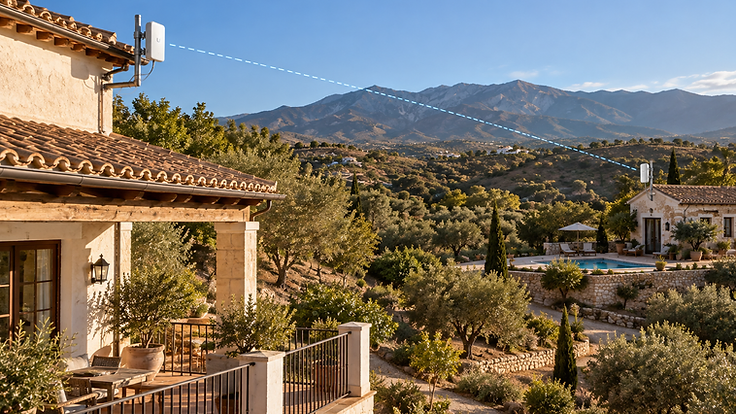
Your internet connection may be perfectly good.
The problem is that it's in the wrong building.
This is extremely common on fincas and rural properties in Spain. Starlink, fibre, rural wireless or 4G/5G may provide a good connection at the main house, while the casita, workshop, garage, gate or guest accommodation sits tens or hundreds of metres away.
Trying to solve that by adding more indoor Wi-Fi extenders is usually the wrong question.
The better question is:
How should we connect the two locations?
Once the remote building has a proper network connection, it can have its own Wi-Fi access point, Ethernet sockets, CCTV, TV, computer, smart devices or other network equipment — all sharing the property's main internet connection.
Don't ask how far the Wi-Fi reaches. Ask how the two locations should be connected.
The three main ways to connect another building
There are three established methods for getting a network connection from one building to another on a rural property. Each has its place, and the right choice depends on the layout, distance, terrain and what you need to work at the far end.
1. Ethernet cable
A direct Ethernet cable run can provide a solid wired connection between two points. For suitable distances and installations, it is simple and reliable.
The practical considerations matter: the installation route, physical protection of the cable, and environmental factors all affect whether a buried or surface-mounted cable run is appropriate. Ordinary copper Ethernet has practical distance limitations — typically around 100 metres for a single run — and improvised outdoor cable runs are best avoided.
Ethernet is not inherently wrong. It is simply a solution with specific constraints, and those constraints need to be respected.
2. Fibre
Fibre optic cable is excellent for building-to-building networking. It is suitable for longer runs than copper Ethernet, carries high capacity, and has one particularly useful property for rural properties: it electrically isolates the network connection between buildings.
That matters because buildings on a finca may have separate electrical earths. A copper cable between two buildings with different earth potentials can, in some circumstances, carry unwanted electrical current. Fibre does not conduct electricity, so it avoids that issue entirely.
Fibre is most practical where trenching or conduit already exists or can sensibly be installed. It requires appropriate termination equipment at each end, but the principle is straightforward: a thin cable carries the network between buildings as light rather than electricity.
3. Point-to-point wireless bridge
Think of it as an invisible network cable through the air.
Two small directional wireless devices are mounted so they face each other — one at the main building, one at the remote building. They create a dedicated, focused link between the two points.
At the remote building, that link can feed:
- a Wi-Fi access point
- a network switch
- computers
- televisions
- CCTV cameras
- other network devices
This is an important distinction: a point-to-point wireless bridge is not simply a powerful Wi-Fi extender. A Wi-Fi extender tries to rebroadcast an existing Wi-Fi signal and hope it reaches further. A wireless bridge creates a purpose-built network link between two specific points, and then hands that network off to whatever equipment you need at the far end.
For many rural properties, this is the most practical way to connect a distant building. You can read more about this approach on our Long-Range Wi-Fi service page.
How far can a wireless bridge work?
Properly designed point-to-point wireless links can operate across substantial distances. But distance alone does not determine whether a link will work.
Viability depends on several factors:
- clear line of sight between the two points
- terrain — hills, ridges and ground contours
- trees and vegetation
- buildings and structures in the path
- mounting height at each end
- frequency and equipment choice
- interference from other wireless sources
- the performance level required at the far end
A clear 500-metre link can be easier to engineer than a blocked 100-metre link.
This is why we do not quote guaranteed ranges. The only reliable way to assess a specific link is to look at the actual path between the two buildings.
Do the buildings need to see each other?
In most cases, yes — the two mounting points need clear line of sight, or very nearly so.
Line of sight does not mean you need to stand at one building and physically see the other building with the naked eye. It means the wireless path between the two devices needs to be reasonably clear of obstructions.
Trees are particularly important. Vegetation can seriously affect wireless links, especially when it is in leaf and wet. A path that looks clear in winter may be far less clear in spring and summer.
This is why a site assessment considers not only the buildings themselves but the path between them.
Do I need another Starlink subscription?
Usually, no.
The purpose of the network link is to share the property's existing internet connection with the other location. That main connection might be:
- Starlink
- fibre
- rural wireless
- 4G/5G
- another suitable broadband connection
Once the network is extended properly to the second building, it uses the same internet connection as the main house. You do not need a second subscription.
This applies to a single property with multiple buildings — a main house and a casita, workshop or guest accommodation on the same land. It would not be appropriate for completely separate properties with unrelated occupants, or in situations where a service provider's terms prohibit sharing a connection.
If you are still deciding on the main connection itself, our article on Rural Wireless Internet vs Starlink covers how to choose between connection types for a rural property.
Can the second building have proper Wi-Fi?
Yes — and this is where the distinction matters.
The building-to-building link gets the network to the remote building. A correctly positioned access point, or suitable mesh or network equipment, then provides Wi-Fi inside that building.
Getting the network to the building and providing Wi-Fi inside the building are two different jobs.
The first is about reaching the building. The second is about covering the building. Both need to be done properly for the end result to work well.
What about a casita or guest accommodation?
The same approach works for a wide range of outbuildings:
- guest houses
- rental accommodation
- home offices
- studios
- workshops
- garages
- pool houses
The remote building can have its own access point and, where appropriate, its own network configuration. For guest or rental accommodation, that might mean a separate Wi-Fi network name so guests connect to their own network rather than the main house network.
This does not require enterprise-grade complexity. It is the same principle applied at a scale that suits the property. Our Finca & Rural Wi-Fi page covers this in more detail.
Can I get internet to a remote gate or CCTV camera?
Yes. Point-to-point links are useful for locations that need network connectivity but are not full buildings:
- entrance gates
- CCTV camera positions
- intercoms
- outbuildings
- remote work areas
Power availability and network design both need to be considered — the remote location needs electricity as well as a network connection. But the wireless link itself can carry the network to the gate or camera position just as it would to a building.
What about a pool or large outdoor area?
Outdoor Wi-Fi is a slightly different question from connecting another building.
For terraces, pools and gardens — areas where you want Wi-Fi coverage outdoors but near the main building — a properly positioned outdoor access point may be more appropriate than a full building-to-building link.
For a separate, distant structure — a pool house at the far end of the garden, for example — a dedicated building-to-building link may be the better choice, feeding an access point inside that structure.
The distinction is between covering an open outdoor area and connecting a specific remote structure. If you already have a connection that works but coverage is the issue, our Wi-Fi & Network Upgrades page may be relevant.
Why not just add another mesh unit?
Mesh Wi-Fi is excellent when the nodes can maintain a good connection to one another. For many homes, it is the correct and simplest solution, and there is nothing wrong with using it in the right situation.
But placing mesh nodes progressively farther apart across a large rural property can produce poor backhaul and unstable performance. Each mesh node relies on the one before it, and as the distance grows, the connection between nodes degrades. A mesh system designed to cover a house was not built to bridge hundreds of metres of open ground.
Mesh is excellent at solving the job it was designed for. It isn't a substitute for a proper building-to-building link when the property requires one.
This is not a criticism of consumer mesh products. It is simply a matter of using the right tool for the right job.
Cable, fibre or wireless bridge — which should I choose?
| Method | Best suited to | Main advantage | Main consideration |
|---|---|---|---|
| Ethernet cable | Shorter, straightforward runs with a viable cable route | Simple, reliable, low cost for suitable distances | Distance limits and physical cable protection |
| Fibre | Longer runs or buildings with different electrical earths | Electrically isolated, high capacity, long distance | Installation route and termination equipment |
| Point-to-point wireless | Distant buildings, difficult terrain, or where cabling is impractical | No trenching, flexible mounting, substantial range | Requires clear line of sight between the two points |
There is no universal winner. The correct choice depends on the distance, the terrain, the cable route options, and what needs to work at the far end. Some properties are best served by a combination of methods.
What information helps assess a rural property?
To work out which approach suits a specific property, a few pieces of initial information are genuinely useful:
- the property location
- which building currently has internet
- which building or location needs connectivity
- the approximate distance between the two points
- photographs from each location looking toward the other
- whether there are trees, buildings or terrain between them
- what needs to work at the remote location (Wi-Fi, CCTV, a computer, a TV)
- whether power is already available at the remote location
Photographs and location information can often help determine whether a site visit is likely to be required. They cannot, on their own, confirm technical viability — a wireless link depends on the actual path conditions, which sometimes need to be assessed on the ground.
But good initial information means we can give you a more useful first response. You can see examples of how we have approached similar properties on our projects page.
Quick answers
Can I get Wi-Fi to a building 100 metres from my house?
Can I get internet to a casita without another Starlink?
How far can a point-to-point wireless bridge work?
Do two buildings need clear line of sight?
Can trees block a wireless bridge?
Is fibre better than a wireless bridge?
Can I connect CCTV at a remote gate?
Can a remote building have its own Wi-Fi network?
Can mesh Wi-Fi reach another building?
Need internet somewhere your router can't reach?
Send us the property location, the approximate distance between the two points and a few photographs looking from one location toward the other. Tell us what you need connected at the remote location. We'll help identify what we'd look at first.
More Articles


From First Message to Fully Connected: What Happens When You Contact Alborán Connect?
From your first WhatsApp or website enquiry to planning, installation, testing and handover — here is what actually happens when you contact Alborán Connect about a rural connectivity problem.


Rural Wireless Internet vs Starlink: Which Is Right for Your Property?
How to decide whether to change your rural internet connection — or improve the Wi-Fi network around your property.


Fast Internet but Poor Wi-Fi? Why Your Network May Be the Real Problem
Why a fast broadband connection doesn't guarantee good Wi-Fi — and what to do about it