
Rural Wireless Internet vs Starlink: Which Is Right for Your Property?
How to decide whether to change your rural internet connection — or improve the Wi-Fi network around your property.
Alborán Connect • Articles
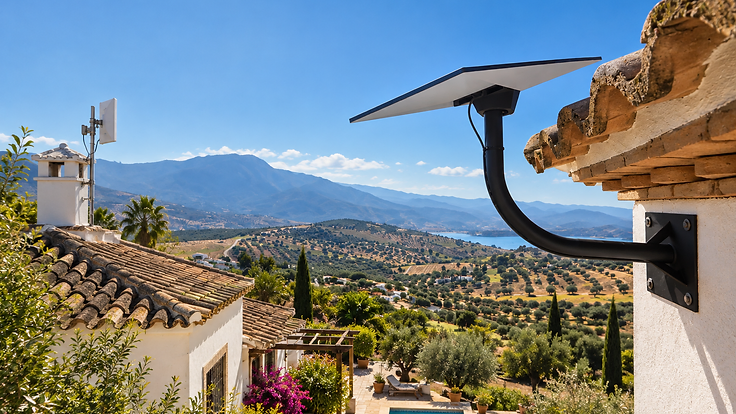
Many rural properties in Spain receive their internet from a small antenna on the roof pointing towards a local transmitter.
You may hear this described as rural wireless, fixed wireless, radio internet or WiMAX.
Whatever your provider calls it, the important question isn't which technology sounds newer. It's whether your current connection is actually delivering what your property needs.
Starlink is another option available to rural properties — but it isn't automatically the right one.
The distinction that matters most
Before comparing technologies, it helps to understand the difference between two separate things:
Internet connection — the service bringing internet to the property. This could be rural wireless, Starlink, 4G/5G, fibre or another provider.
Property network — the Wi-Fi, cabling, mesh, access points and other equipment distributing that connection around the property.
These are not the same thing. A fast connection delivered to a single router doesn't guarantee good Wi-Fi in the bedroom, the garden or the casita. And replacing the connection won't fix a problem that's actually caused by the network distributing it.
This distinction is central to everything below.
Should I replace my rural wireless internet with Starlink?
There is no universal answer.
Keep the existing connection when:
- it is reliable
- available speeds meet the household's requirements
- latency and upload performance are acceptable for how it is used
- the monthly cost is acceptable
- the actual problem is Wi-Fi coverage rather than the incoming connection
Consider Starlink when:
- the existing rural connection is consistently too slow
- reliability is poor
- the property has limited viable terrestrial alternatives
- additional performance would provide a genuine benefit
- the existing connection cannot support how the property is now being used
Starlink is not always faster, always more reliable or universally superior. The right answer depends on what your property actually needs.
Before changing provider, perform one simple test
Run a speed test while standing close to the existing router or main access point. Note the result.
Then compare that performance with the areas where internet feels poor.
If performance is good beside the router but poor elsewhere, changing the incoming internet service may not solve the problem. The likely issue is the property network — not the connection itself.
In that situation, a new dish on the roof won't fix the Wi-Fi in the kitchen.
Fast internet. Bad Wi-Fi.
Many rural properties in Spain have construction that makes Wi-Fi distribution difficult:
- thick masonry walls
- reinforced construction
- multiple floors
- long properties
- terraces and pools
- detached guest accommodation
- workshops and garages
- remote gates
- CCTV
- separate buildings
These problems are not solved by changing internet provider. They may require appropriate mesh placement, wired access points, outdoor access points, Ethernet or fibre cabling, or point-to-point wireless links — depending on the property.
Not every property needs professional networking equipment. Some homes are well served by a straightforward mesh kit, correctly placed. Others genuinely need designed infrastructure.
If you're dealing with thick walls, separate buildings or large outdoor areas, Wi-Fi & Network Upgrades can help identify the right approach.
Can I install a mesh Wi-Fi system myself?
Absolutely.
Modern consumer mesh systems are intentionally easy to install. For many ordinary homes, a two or three-node mesh kit can provide an excellent solution without professional assistance. If your property is relatively compact and construction is straightforward, a DIY mesh system may be all you need.
But there's an important distinction: installing a mesh system is easy. Designing the right network isn't always.
Professional design becomes more relevant when dealing with:
- difficult building construction
- several floors
- separate buildings
- large outdoor areas
- long distances
- existing Ethernet infrastructure
- CCTV
- gates
- guest accommodation
- business-critical connectivity
Alborán Connect also uses straightforward mesh solutions when they are appropriate. The objective is not to sell complexity.
Simple property. Simple solution. Complex property. Design it properly.
What if my current rural internet is actually good?
Then keep it.
Alborán Connect does not recommend replacing a working internet connection simply because another technology is newer. If your existing rural wireless service is reliable and provides the performance you need, the correct solution may simply be improving how that connection is distributed around the property.
Good internet with bad Wi-Fi is a network problem — not a connection problem.
What if rural wireless isn't good enough?
Starlink can provide another option for properties where terrestrial rural connectivity is unavailable or no longer meets requirements.
Correct dish positioning and an unobstructed view of the required sky area are important for reliable performance. A professional Starlink installation includes assessing the best position at your property — not simply mounting the dish where the cable happens to reach.
But installing Starlink and designing whole-property Wi-Fi are two separate tasks. A new connection still needs to be distributed properly to reach every room, terrace and outbuilding.
For properties with separate buildings, Long-Range Wi-Fi links can carry the connection at full speed to a casita, workshop or guest house — without a second internet contract.
How do they compare?
| How it reaches you | Infrastructure | Best for | Wi-Fi design still needed? | |
|---|---|---|---|---|
| Rural wireless | Antenna to a local transmitter | Local tower, line of sight | Properties near a provider's tower | Yes |
| Starlink | Satellite dish, clear sky view | Self-contained | Properties with limited terrestrial options | Yes |
| 4G/5G | Mobile network signal | Mobile coverage at the property | Properties with strong mobile signal | Yes |
| Fibre | Physical cable to the property | Fibre infrastructure in the area | Properties where fibre is installed | Yes |
Installation considerations vary by technology — from antenna mounting (rural wireless) to dish positioning (Starlink) to a professional fibre connection. But regardless of how the internet arrives, the Wi-Fi network distributing it around the property is a separate task.
Rural properties we work with
We regularly design connectivity for fincas, cortijos and rural properties across Andalucía where the internet connection works but the Wi-Fi doesn't reach. You can also see real projects where we've solved these problems in the field.
Each property is different — and the right solution depends on the construction, the layout and how the property is actually used.
Related article: How Do I Get Internet to Another Building on My Finca? — Coming soon
Quick answers
What is rural wireless internet?
Is WiMAX the same as rural wireless internet?
Is Starlink better than rural wireless internet?
Will Starlink fix bad Wi-Fi inside my house?
Can I keep my existing internet and just improve my Wi-Fi?
Can Starlink cover a separate casita or guest house?
Can I install mesh Wi-Fi myself?
Do I need another Starlink connection for another building?
Still not sure what your property needs?
Tell us where the property is, what internet connection you currently have and what isn't working. We'll help identify what we'd look at first.
More Articles


From First Message to Fully Connected: What Happens When You Contact Alborán Connect?
From your first WhatsApp or website enquiry to planning, installation, testing and handover — here is what actually happens when you contact Alborán Connect about a rural connectivity problem.


How Do I Get Internet to Another Building on My Finca?
Your internet connection may be perfectly good — the problem is that it's in the wrong building. How to connect a casita, workshop, garage, gate or guest house on a rural Spanish property.


Fast Internet but Poor Wi-Fi? Why Your Network May Be the Real Problem
Why a fast broadband connection doesn't guarantee good Wi-Fi — and what to do about it